For years, I was a creature of habit. My gaming life was defined by the sleek, predictable ecosystem of home consoles. I knew exactly how those controllers felt in my hand, and I was perfectly content with the “standard” way of doing things. But then, the Steam Deck happened.
I’ll admit, I was late to the party, but once I experienced the ergonomics of Valve’s handheld, there was no going back. There is something about the way the Deck fills the palms and places every button exactly where it needs to be that makes a standard console gamepad feel a bit… thin. So, when Valve announced the new Steam Controller ($149 AUD), promising to bring that specific handheld DNA to the desktop, I had to see if the magic translated.

Learning from the Past (Without Living in It)
Full disclosure: I never touched the original Steam Controller from 2015. I heard the stories, the weird circular pads, the lack of a proper right thumbstick, and the steep learning curve. It sounded like a noble experiment that didn’t quite land.
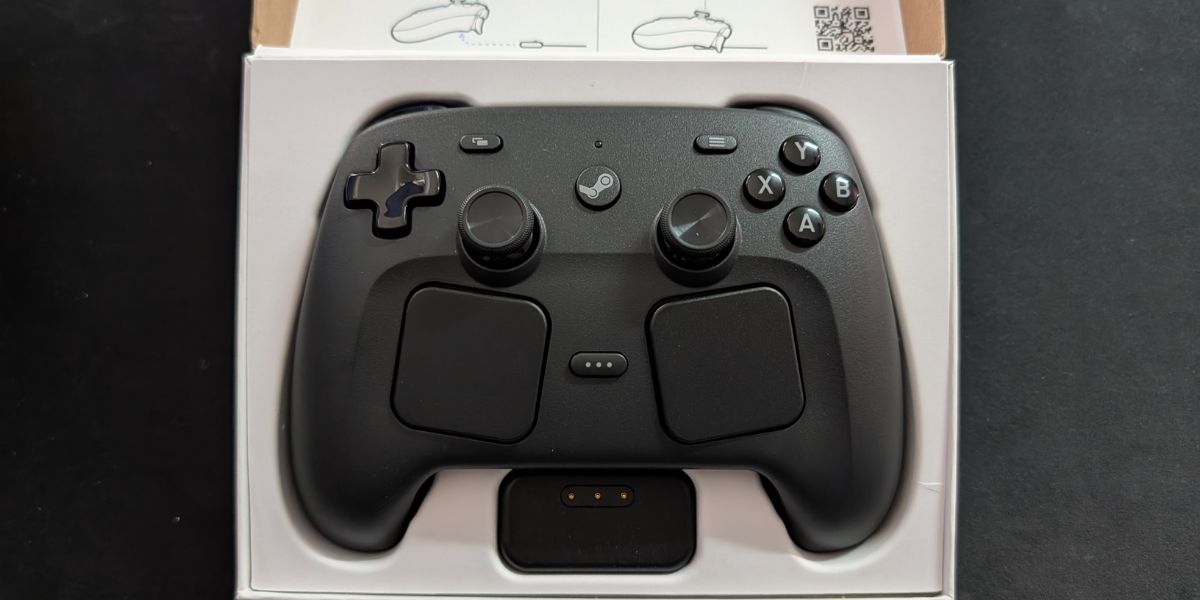
This new iteration feels like Valve took all those lessons, threw them into a blender with the Steam Deck’s design language, and poured out something genuinely premium. It doesn’t look like a science project anymore; it looks like a high-end “Pro” controller, albeit one that is slightly broader to accommodate its unique features.
The Magic of TMR and Touchpads
The first thing I noticed was the thumbsticks. Valve has utilised TMR (Tunnel Magnetoresistance) sensors. Without getting bogged down in the physics, these use magnets to track movement, which essentially eliminates the dreaded “stick drift” that plagues so many console controllers. In practice, they feel incredibly smooth and tensioned to perfection.

Then there are the haptic touchpads. On the Steam Deck, I found these surprisingly useful for navigating menus or playing strategy games. On this standalone controller, they are positioned just below the sticks. While I still use the thumbsticks for 90% of my gaming, having those pads for precise mouse-like control in game or even just navigating the desktop is a revelation. It turns a “PC-only” experience into something that feels natural from the couch and that feeling will only be further extended when the Steam Machine launches. Currently running the Steam Deck on a dock into a monitor and using the controller is a really good option though.
Customisation That Actually Makes Sense
I usually find “deep customisation” to be a bit of a chore. I just want to turn it on and play. However, the integration here is seamless. Because it is designed for SteamOS, the controller knows what you’re playing. This is a bit like the Apple mentality of “everything just works” and I am here for that.
If you want to spend three hours mapping every radial menu and haptic click, you can. But for the rest of us, the community-made layouts are a lifesaver. Within seconds, I had a layout for an tactical RPG that felt as intuitive as if the game had been designed for a gamepad from day one. That is the best part really, there doesn’t seem to be anything that holds the device back, even a game like Torchknight which requires a mouse click for movement is pretty easilly converted to the joystick controls.
Nerd Nest actually has some great hints and tips for that and has delivered it in a way that is easy to understand for new users. Watch it here.
The “Puck” and the Power
The charging situation is equally clever. It comes with a 2.4GHz USB-C transmitter known as the “Puck.” It magnetically snaps to the controller to charge and pair, which is a satisfying little ritual at the end of a session. Valve claims about 35 hours of battery life, that seems to be pretty spot on, but much like the Steam Deck it all comes down to what you are playing and how much it uses the full features of the device. It easily outlasts my standard console controllers, which usually start flashing red after a few hour session.

The Catch (Because There is Always One)
Is it perfect? Not quite. Its biggest strength is also its greatest limitation: it is built for Steam. If you are hoping to use this for your console or even certain other PC launchers without a bit of technical fiddling, you are going to be disappointed. It is a specialist tool, designed for a specific ecosystem. To get the most out of the device and all of its extras, you’ll need to be on Steam. This might just mean pairing your games to the steam launcher, no big deal.
For someone who has fallen hard for the Steam Deck’s way of doing things, this controller is a triumph. It takes that wonderful handheld comfort and brings it to the big screen. It’s cheeky, it’s clever, and for the first time in a decade, I might actually be putting my console gamepads onto the bottom shelf, just slightly out of reach.